

Obtenir un modèle de catalogue
1
Open the part
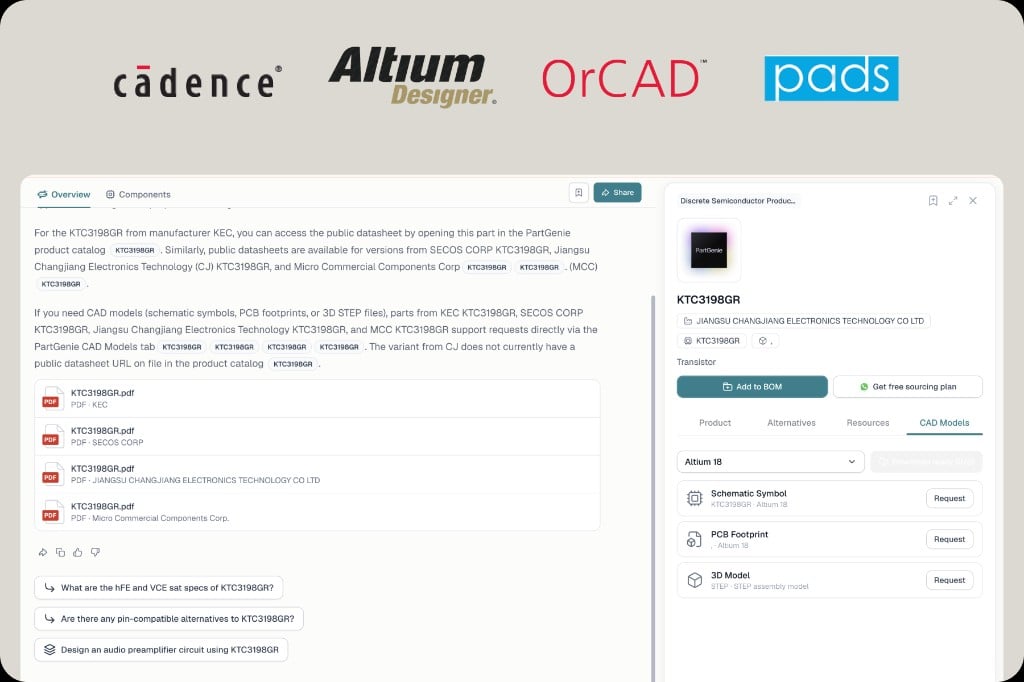
Search the MPN, then click the MPN badge in the answer or the part card. That opens the component drawer.
2
Switch to CAD Models
The drawer tabs are Product, Procurement, and CAD Models. Procurement is live price and stock. CAD Models is the footprint library for that part.
3
Pick your EDA format
Use the format dropdown (for example Altium 18, Cadence, OrCAD, PADS, or KiCad when listed).
4
Request or download
Click Request for schematic symbol, PCB footprint, or STEP 3D when FootprintKu fulfills professional models for that MPN. Download directly when a catalog file is already available.Not every MPN has every format. If nothing is listed, use KiCad generation instead of guessing a generic 0603.
Quand générer à la place
Générer une bibliothèque KiCad lorsque:- Les modèles CAO n’ont pas de fichier pour ce MPN et ce package exacts
- Vous avez besoin d’un symbole + Empreinte + PAS ensemble, avec un tableau de preuves (nombre de broches, corps, pad, pas) lié à une page de fiche technique
- Vous voulez * * l’importation native de KiCad * * vérifie avant de placer la pièce
Liés
- [génération de la bibliothèque KiCad] (/fr-FR / bibliothèque kicad)
- [Approvisionnement en direct](/fr-FR/approvisionnement en direct)-l’onglet Approvisionnement à côté des modèles CAO
- [Datasheet citations] (/fr-FR / datasheet-citations)