

- ** Katalogmodelle ** - Symbol, Footprint und STEP bereits in PartGenie für viele MPNs. — ** KiCad-Generierung (Beta) ** - Erstellen Sie KiCad 8-Bibliotheken aus dem Datenblatt mit Nachweis- und Importprüfungen.
Wähle einen Pfad
/ Du brauchst / Benutze | | --- | --- | / Dateien, die sich bereits im Katalog für Ihre MPN befinden | Katalogmodelle herunterladen | / KiCad 8 Symbol + Footprint + 3D mit Nachweis | KiCad import | / Altium / Eagle / OrCAD | Allegro / Laden Sie das unter ** CAD-Modelle ** aufgeführte Format herunter und importieren Sie es in Ihr Tool | Details zu Katalog vs generierten Bibliotheken: [ECAD & footprints] (/ de-DE / ecad-Modelle). Exemplarische Vorgehensweise für die vollständige Generierung: Generierung der KiCad-Bibliothek.Katalogmodelle herunterladen
1
Open the part
In Search, click the MPN badge or part card. In Chrome, open CAD models from the sidebar on a supported distributor page.
2
Open CAD Models
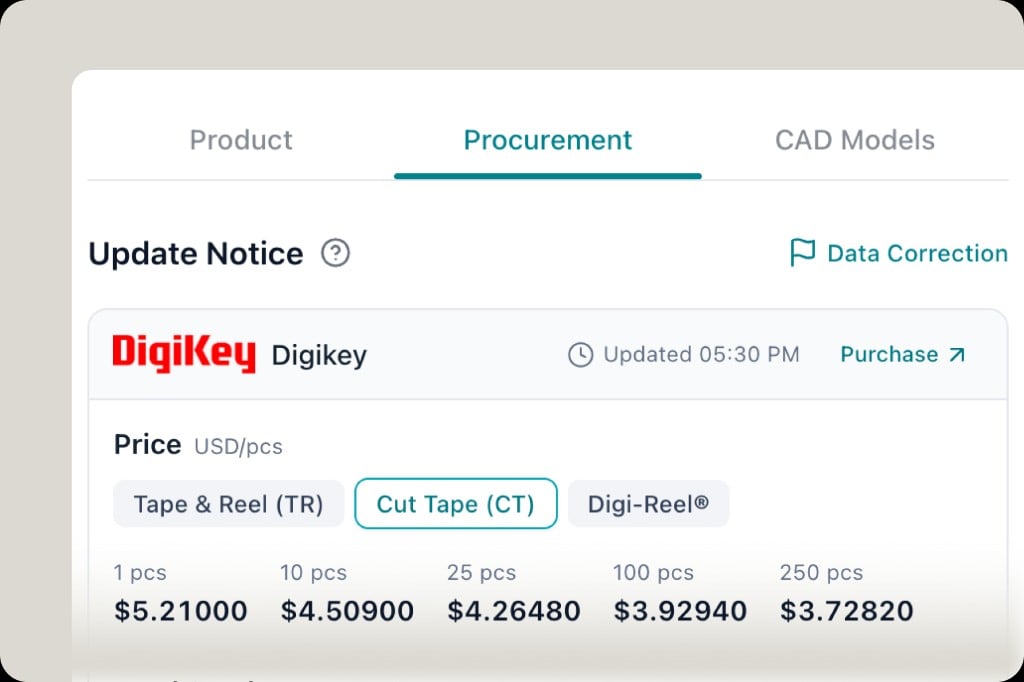
In the component drawer, tabs are Product, Procurement, and CAD Models. Procurement is live price and stock; CAD Models is the footprint library.
3
Choose format and download
Download the symbol, footprint, and/or 3D files offered for your EDA (Altium, KiCad, Eagle, OrCAD, Allegro, and others when listed). Not every MPN has every format—if the tab is empty, generate KiCad or contact support.
4
Import into your EDA
Follow your vendor’s import steps for the file type you downloaded. Confirm pin 1, pitch, and courtyard against the datasheet before you release the library to the team.
Altiumdesigner
- Laden Sie die ** Altium**-Assets (oder neutraler PCB-Footprint / SCHRITT) von ** CAD-Modellen ** herunter.
- Importieren oder kopieren Sie in Altium Ihre Projektbibliotheken (.PcbLib / .SchLib oder Unified Library Flow, den Ihr Team verwendet).
- Weisen Sie dem Schaltplansymbol den Footprint und das 3D-Modell zu und führen Sie dann Ihren üblichen DRC aus.
Adler / Fusionselektronik
Laden Sie Eagle-kompatible oder generische Footprint-Assets herunter, wenn sie in ** CAD-Modellen** aufgeführt sind, und fügen Sie sie dann über Eagles Bibliothekseditor oder Fusion Electronics Library Management hinzu.OrCAD / Allegro
Laden Sie das OrCAD- oder Allegro-Format herunter, wenn PartGenie es für die MPN auflistet, und importieren Sie es dann über Ihren Cadence-Bibliothekspfad. STEP-Modelle werden für 3D-Kollisionsprüfungen dort angehängt, wo Ihr Flow sie unterstützt.KiCad importieren
Die Generierung erfolgt in PartGenie (Web oder Chrome). KiCad 8 ist das Zielformat.1
Generate the library
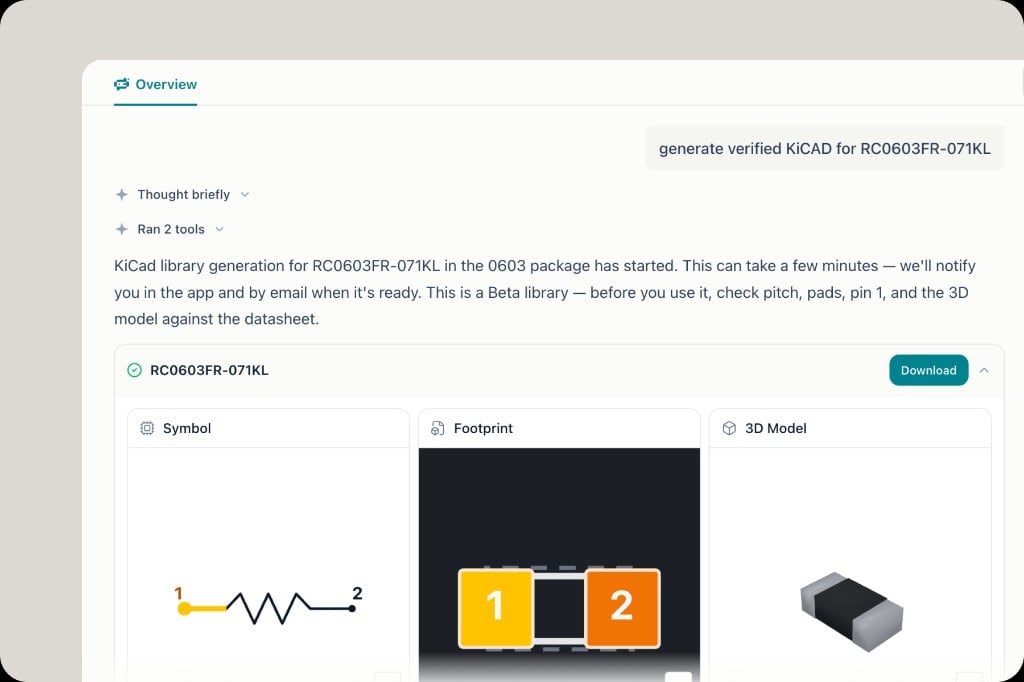
In Search (not Work), ask for example:P0Or use CAD models → generate from the part page. Wait for the in-app notice and email—generation can take a few minutes.
2
Review evidence
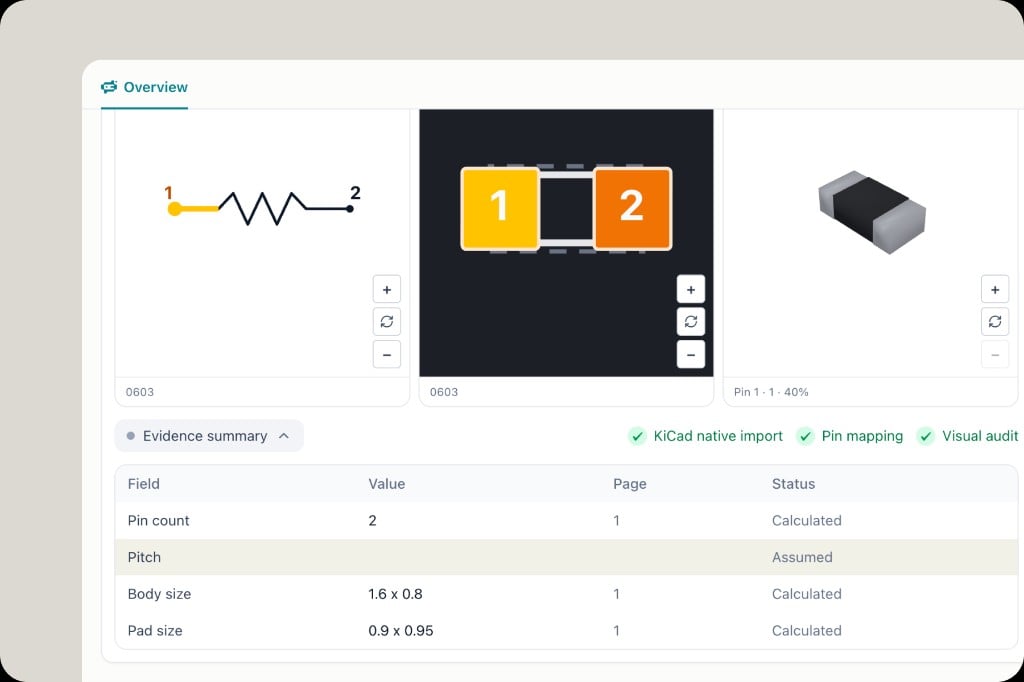
Open the finished card: Symbol, Footprint, 3D Model, and Evidence summary (Calculated vs Assumed). Check KiCad native import, Pin mapping, and Visual audit before you download.
3
Download
Click Download on the library card. You receive KiCad 8
P1
,
P2
, and 3D files PartGenie already checked with a machine import pass.
4
Add to your KiCad project
In KiCad 8:
- Place symbol and footprint files in your project or global library folders (or paths your team standardizes on).
- Update sym-lib-table and fp-lib-table so KiCad resolves the new library names.
- Reload libraries in the Symbol or Footprint editor, place the part on the schematic, and associate the footprint.
- Open the 3D viewer and compare body height and pin 1 to the datasheet.
Credits und Abrechnung
Die KiCad-Generierung verwendet ** Credits **. Katalog ** ECAD-Modelle herunterladen ** kann je nach Plan separat in Rechnung gestellt werden — siehe [Mitgliedschaft & Preise] (/ de-DE / Mitgliedschaftspreise).Zusammenhang
- Integrationen Übersicht
- [Chrome-Erweiterung](/ de-DE / chrome-Erweiterung)
- Generierung der KiCad Bibliothek
- ECAD & Fußabdrücke