> ## Documentation Index
> Fetch the complete documentation index at: https://help.partgenie.ai/llms.txt
> Use this file to discover all available pages before exploring further.
# Chrome 扩展
> 在 DigiKey、Mouser、LCSC 等商品页旁做器件研究,无需反复复制料号
**PartGenie for Chrome** 在支持的分销商或原厂**商品页**上识别 MPN。替代料、规格书对话、ECAD、比价都在侧边栏完成,不用新开标签去搜。
安装:[Chrome 网上应用店](https://chromewebstore.google.com/detail/partgenie/djhpmidamklapnaidbhljfpbnnlninmk)。
## 安装与登录
打开 [Chrome 网上应用店中的 PartGenie](https://chromewebstore.google.com/detail/partgenie/djhpmidamklapnaidbhljfpbnnlninmk),点 **添加至 Chrome**。常用的话把 PartGenie 图标固定在工具栏。
点 PartGenie 图标,或在支持的商品页打开侧边栏。使用与 [app.partgenie.ai](https://app.partgenie.ai) 相同的账号登录。
进入支持站点(例如 **DigiKey**、**Mouser**、**LCSC**)的**产品详情页**。PartGenie 从页面读取 MPN 并加载该料的研究结果。
扩展只在**支持**的页面上提供器件助手,不会注入到无关网站。
## 使用侧边栏
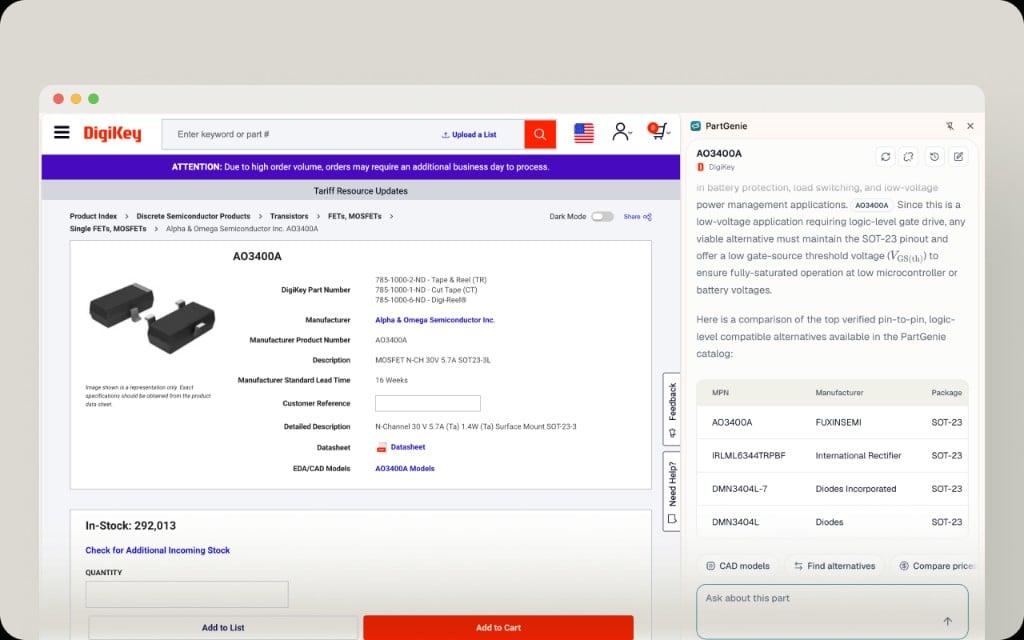 商品页打开侧边栏后:
| 控件 | 作用 |
| - | - |
| 标题(MPN + 来源) | 确认 PartGenie 匹配到的料号 |
| 回答区 | 摘要、规格、带依据的替代料对比表 |
| **CAD models** | 打开目录 ECAD,或为本 MPN 发起 KiCad 生成 |
| **Find alternatives** | 基于规格书与项目上下文的替代料深挖 |
| **Compare prices** | 跨分销商比价与库存(与网页实时采购同源) |
| **Ask about this part** | 针对当前器件对话——引脚、极限、替换 |
替代料会附带可核对的依据,不只是参数表对表。量产换料前请先看引用来源。
## 悬浮工具栏
商品页打开侧边栏后:
| 控件 | 作用 |
| - | - |
| 标题(MPN + 来源) | 确认 PartGenie 匹配到的料号 |
| 回答区 | 摘要、规格、带依据的替代料对比表 |
| **CAD models** | 打开目录 ECAD,或为本 MPN 发起 KiCad 生成 |
| **Find alternatives** | 基于规格书与项目上下文的替代料深挖 |
| **Compare prices** | 跨分销商比价与库存(与网页实时采购同源) |
| **Ask about this part** | 针对当前器件对话——引脚、极限、替换 |
替代料会附带可核对的依据,不只是参数表对表。量产换料前请先看引用来源。
## 悬浮工具栏
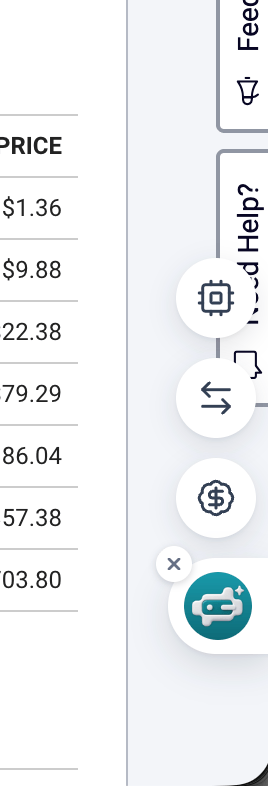 部分页面边缘会出现紧凑的**悬浮工具栏**,可快速打开器件详情、替代料或比价。不需要时点 **×** 收起。
## 从扩展拿 ECAD
在侧边栏 **CAD models** 中:
1. 若 **CAD Models** 有文件,直接下载 symbol、footprint 或 3D。
2. 或发起 **KiCad 库生成**(Beta),完成后下载。
导入 EDA 的步骤见 [EDA 集成](/zh-Hans/eda-integration)。
## 打开完整网页
侧边栏里的链接可进入 **PartGenie 完整器件页**,或在 Search 里继续用 Projects、BOM、Design、Knowledge。
## 支持的站点
目前已覆盖 **DigiKey**、**Mouser**、**LCSC** 等主要分销商,以及 PartGenie 可识别的更多原厂 / 分销页面。覆盖会持续增加;若你常用的页面尚未支持,请联系 [support@partgenie.ai](mailto:support@partgenie.ai)。
## 隐私与权限
扩展需要访问支持的商品页,才能读取 MPN 与识别器件所需的页面上下文。扩展不会代替你在分销商登录,也不会替你下单——**Purchase** 链接触发的是分销商自己的购买流程。
## 故障排查
| 现象 | 建议 |
| - | - |
| 侧边栏空白或料号不对 | 刷新商品页;确认是 SKU 详情 URL,不是搜索结果列表 |
| 登录循环 | 允许 PartGenie 第三方 Cookie,或先在 app.partgenie.ai 登录再刷新页面 |
| 某分销站没有扩展 | 可能尚未支持——改用 [Search](/zh-Hans/ai-search) 输入 MPN |
更多账号问题:[账户故障排查](/zh-Hans/account-troubleshooting)。
## 相关
* [集成总览](/zh-Hans/integrations)
* [EDA 集成](/zh-Hans/eda-integration)
* [更新日志 — PartGenie for Chrome](/zh-Hans/changelog)
This documentation is built and hosted on [Mintlify](https://mintlify.com), a developer documentation platform.
部分页面边缘会出现紧凑的**悬浮工具栏**,可快速打开器件详情、替代料或比价。不需要时点 **×** 收起。
## 从扩展拿 ECAD
在侧边栏 **CAD models** 中:
1. 若 **CAD Models** 有文件,直接下载 symbol、footprint 或 3D。
2. 或发起 **KiCad 库生成**(Beta),完成后下载。
导入 EDA 的步骤见 [EDA 集成](/zh-Hans/eda-integration)。
## 打开完整网页
侧边栏里的链接可进入 **PartGenie 完整器件页**,或在 Search 里继续用 Projects、BOM、Design、Knowledge。
## 支持的站点
目前已覆盖 **DigiKey**、**Mouser**、**LCSC** 等主要分销商,以及 PartGenie 可识别的更多原厂 / 分销页面。覆盖会持续增加;若你常用的页面尚未支持,请联系 [support@partgenie.ai](mailto:support@partgenie.ai)。
## 隐私与权限
扩展需要访问支持的商品页,才能读取 MPN 与识别器件所需的页面上下文。扩展不会代替你在分销商登录,也不会替你下单——**Purchase** 链接触发的是分销商自己的购买流程。
## 故障排查
| 现象 | 建议 |
| - | - |
| 侧边栏空白或料号不对 | 刷新商品页;确认是 SKU 详情 URL,不是搜索结果列表 |
| 登录循环 | 允许 PartGenie 第三方 Cookie,或先在 app.partgenie.ai 登录再刷新页面 |
| 某分销站没有扩展 | 可能尚未支持——改用 [Search](/zh-Hans/ai-search) 输入 MPN |
更多账号问题:[账户故障排查](/zh-Hans/account-troubleshooting)。
## 相关
* [集成总览](/zh-Hans/integrations)
* [EDA 集成](/zh-Hans/eda-integration)
* [更新日志 — PartGenie for Chrome](/zh-Hans/changelog)
This documentation is built and hosted on [Mintlify](https://mintlify.com), a developer documentation platform.