> ## Documentation Index
> Fetch the complete documentation index at: https://help.partgenie.ai/llms.txt
> Use this file to discover all available pages before exploring further.
# Share
> Share chat answers and BOMs by email invite or link
You can **share** chat answers and BOMs with teammates.
## How to share
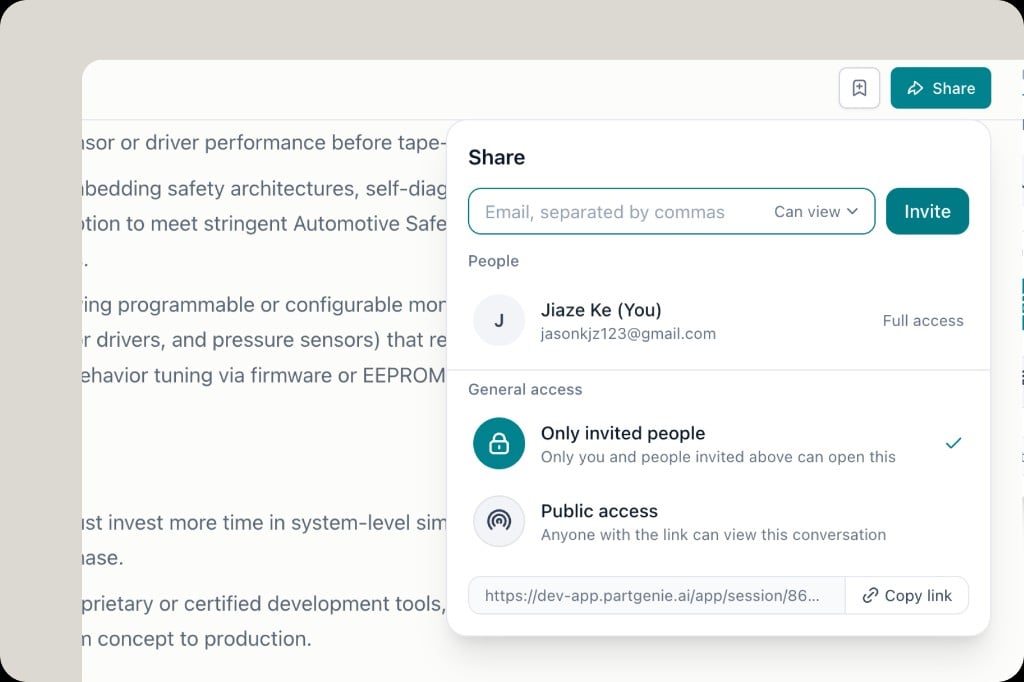
1. Open a chat session or BOM and click **Share**
2. Enter emails (comma-separated) and choose permission (e.g. **Can view**)
3. Click **Invite** — invitees receive an **email notification**
4. Or **Copy link** to share directly
 ## Access levels
* **Only invited people** — private to you and invitees
* **Public access** — anyone with the link can view
Owner keeps **Full access**. Adjust invites anytime from the Share dialog.
## Access levels
* **Only invited people** — private to you and invitees
* **Public access** — anyone with the link can view
Owner keeps **Full access**. Adjust invites anytime from the Share dialog.