> ## Documentation Index
> Fetch the complete documentation index at: https://help.partgenie.ai/llms.txt
> Use this file to discover all available pages before exploring further.
# Product comparison
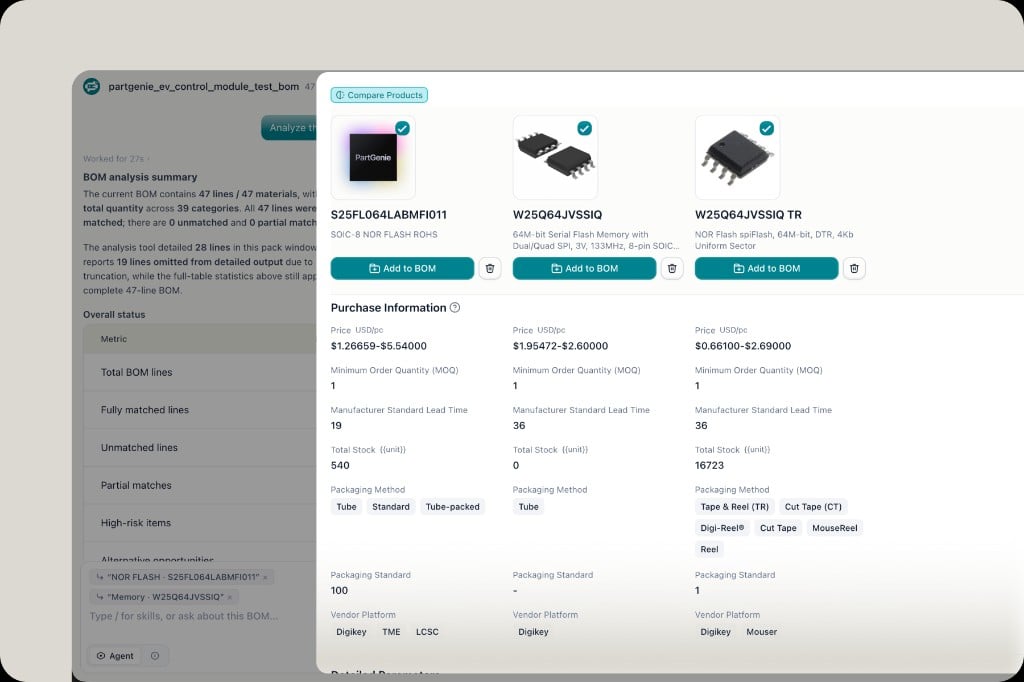
> Compare MPNs side by side—specs, live stock, price, and fit
Comparison in PartGenie is built for sourcing and design decisions: pick candidates, then evaluate them together with live data when available.
## Where to compare
* **Search / alternative answers** — select products in tables or result cards
* **BOM** — multi-select lines and click **Compare**
* **Alternative report** — structured shortlist you can export (PDF/Word)
See [Alternatives](/en-US/alternatives) for clarification prompts, relation types (upgrade path / functional alternate), and report export.
## What the compare view shows
Typical columns include stock, price (with MOQ), lead time, confidence / relation notes, and distributor source. Use **Purchase** from procurement when you're ready to buy—see [Live sourcing](/en-US/live-sourcing).
 ## Tips
* Compare **2–5** candidates; more than that usually hurts clarity
* Confirm package, firmware, and electrical limits before design-in—catalog similarity ≠ drop-in
* Export tables from answers when on **Pro** (hover table → download)
## Related
* [Alternatives](/en-US/alternatives)
* [Live sourcing](/en-US/live-sourcing)
* [AI Search](/en-US/ai-search)
## Tips
* Compare **2–5** candidates; more than that usually hurts clarity
* Confirm package, firmware, and electrical limits before design-in—catalog similarity ≠ drop-in
* Export tables from answers when on **Pro** (hover table → download)
## Related
* [Alternatives](/en-US/alternatives)
* [Live sourcing](/en-US/live-sourcing)
* [AI Search](/en-US/ai-search)