> ## Documentation Index
> Fetch the complete documentation index at: https://help.partgenie.ai/llms.txt
> Use this file to discover all available pages before exploring further.
# KiCad library generation
> Generate a verified KiCad symbol, footprint, and STEP 3D for an MPN, then download the library (Beta)
**KiCad library generation (Beta)** builds a part library from PartGenie's component database and the datasheet: **Symbol**, **Footprint**, and **STEP 3D**, plus an evidence summary you can check before you drop it into a board.
This is different from downloading a catalog model on the part page. Catalog assets live on the component **CAD Models** tab — see [ECAD & footprints](/en-US/ecad-models). Use generation when you need a KiCad-native library with pin, pad, and visual checks attached.
## Generate a library
Open [app.partgenie.ai](https://app.partgenie.ai) and stay on **Search** (not Work).
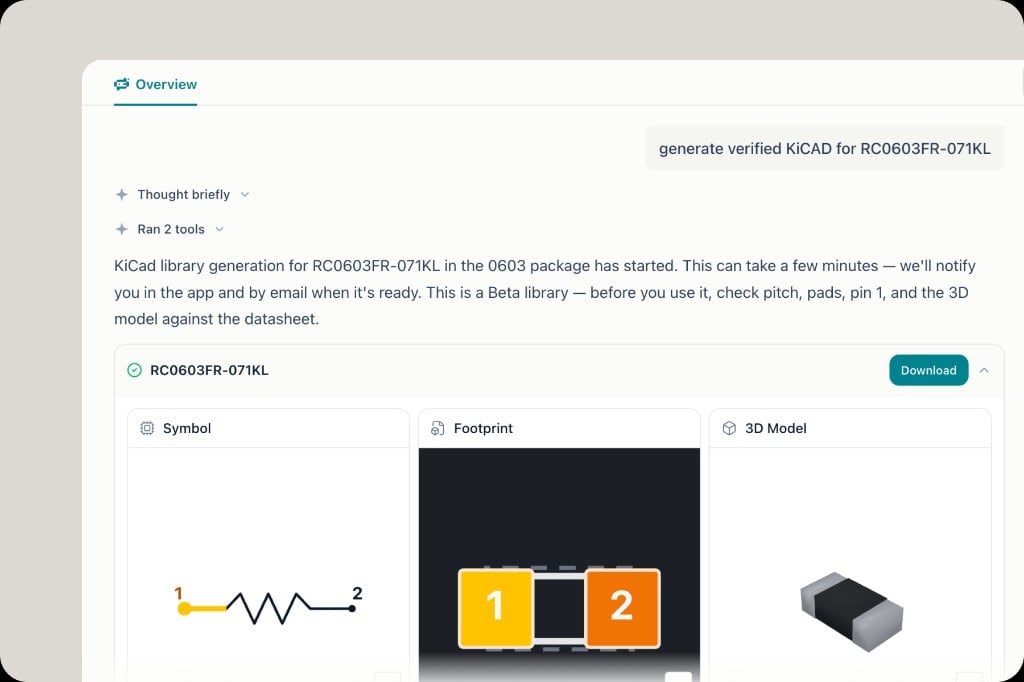
Use the MPN and package in the prompt:
```
generate verified KiCAD for RC0603FR-071KL
```
You can also say *symbol, footprint, and 3D model* for a specific MPN such as `STM32F103RET6` or `OPA810IDBVR`.
Generation can take a few minutes. PartGenie tells you it has started and notifies you **in the app and by email** when the library is ready. You can leave the chat and come back from **Recents** or **⌘K**.
The finished card shows three previews:
* **Symbol** — schematic symbol and pin numbers
* **Footprint** — pad layout (for example 0603 pads 1 and 2)
* **3D Model** — STEP body
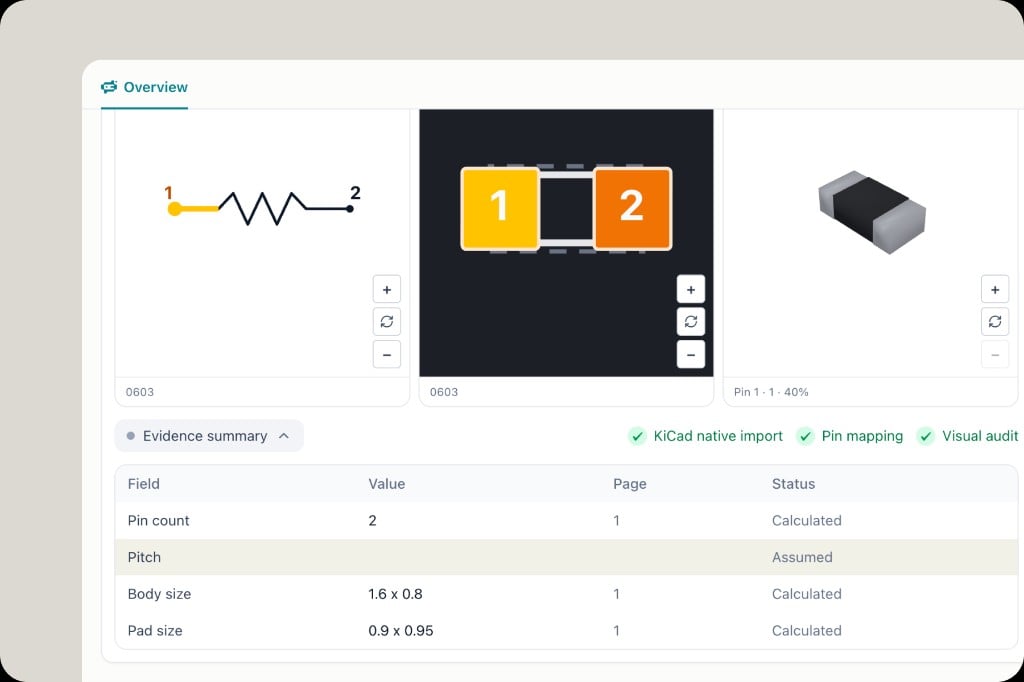
Status chips on a finished library include **KiCad native import**, **Pin mapping**, and **Visual audit**.
Expand **Evidence summary**. Each row is a field (pin count, pitch, body size, pad size), the value used, the **datasheet page** it came from, and a status:
* **Calculated** — derived from datasheet or package data
* **Assumed** — a default the engine filled in (pitch is a common one)
Treat **Assumed** rows as items you must confirm.
Click **Download** on the part card and import the files into your KiCad project libraries.
 ## Before you fabrication-release
Libraries are **Beta**. Before you use one, check pitch, pads, pin 1, and the 3D model against the datasheet. An Assumed pitch or a wrong pin-1 mark will not be caught by a visual thumbnail alone.
* Open the cited datasheet page from the evidence table (see [Datasheet citations](/en-US/datasheet-citations))
* Confirm pin 1 on both the symbol and the footprint
* If something is wrong, reply in the same chat with the correction — and send feedback so the generator can improve
## Where files go afterward
Downloaded libraries are yours to import into KiCad. The chat that produced them stays in **Recents**. Related reports and files can also land in [Knowledge](/en-US/knowledge) when PartGenie saves the artifact.
## Related
* [ECAD & footprints](/en-US/ecad-models) — catalog models already on the part
* [Design mode](/en-US/design-mode) — architecture and BOM before you draw the board
* [AI Search](/en-US/ai-search)
## Before you fabrication-release
Libraries are **Beta**. Before you use one, check pitch, pads, pin 1, and the 3D model against the datasheet. An Assumed pitch or a wrong pin-1 mark will not be caught by a visual thumbnail alone.
* Open the cited datasheet page from the evidence table (see [Datasheet citations](/en-US/datasheet-citations))
* Confirm pin 1 on both the symbol and the footprint
* If something is wrong, reply in the same chat with the correction — and send feedback so the generator can improve
## Where files go afterward
Downloaded libraries are yours to import into KiCad. The chat that produced them stays in **Recents**. Related reports and files can also land in [Knowledge](/en-US/knowledge) when PartGenie saves the artifact.
## Related
* [ECAD & footprints](/en-US/ecad-models) — catalog models already on the part
* [Design mode](/en-US/design-mode) — architecture and BOM before you draw the board
* [AI Search](/en-US/ai-search)