> ## Documentation Index
> Fetch the complete documentation index at: https://help.partgenie.ai/llms.txt
> Use this file to discover all available pages before exploring further.
# Chrome extension
> Research parts on DigiKey, Mouser, LCSC, and other supported pages without leaving the listing
**PartGenie for Chrome** recognizes the MPN on a supported distributor or manufacturer product page. Alternatives, datasheet chat, ECAD, and price comparison stay in a sidebar beside the part—no copy-paste into a new tab.
Install from the [Chrome Web Store](https://chromewebstore.google.com/detail/partgenie/djhpmidamklapnaidbhljfpbnnlninmk).
## Install and sign in
Open the [PartGenie listing in the Chrome Web Store](https://chromewebstore.google.com/detail/partgenie/djhpmidamklapnaidbhljfpbnnlninmk) and click **Add to Chrome**. Pin the PartGenie icon in the toolbar if you use it often.
Click the PartGenie icon or open the sidebar on a supported product page. Sign in with the same account you use at [app.partgenie.ai](https://app.partgenie.ai).
Navigate to a product detail page on a supported site (for example **DigiKey**, **Mouser**, or **LCSC**). PartGenie reads the MPN from the page and loads research for that exact part.
The extension only runs component assistance on **supported** pages. It does not inject into unrelated sites.
## Use the sidebar
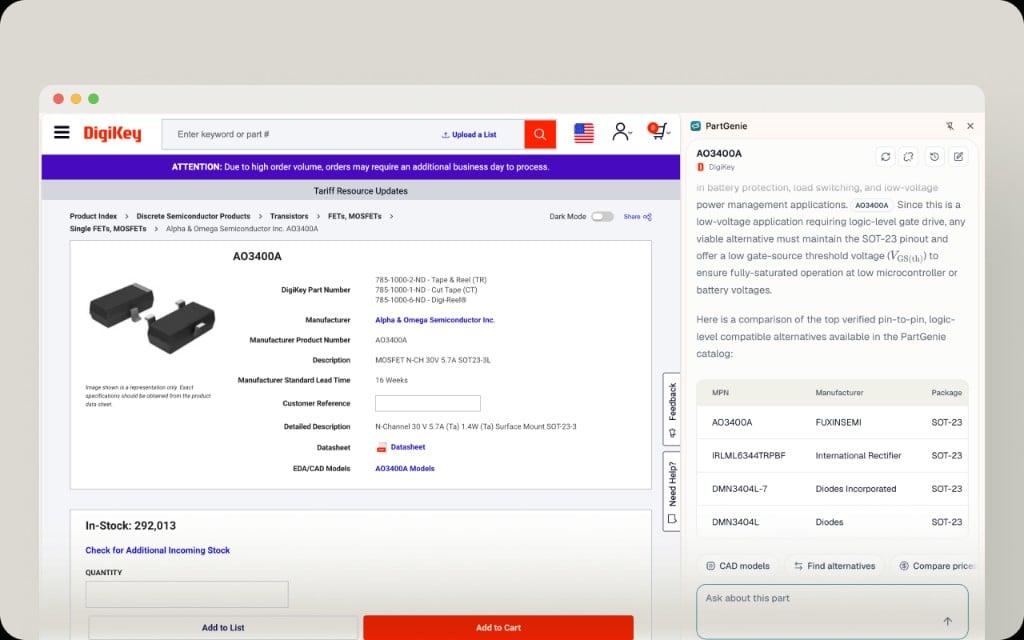 When the sidebar opens on a product page:
| Control | Purpose |
| - | - |
| Header (MPN + source) | Confirms which part PartGenie matched on this page |
| Answer area | Summary, specs, and alternative comparison tables with evidence you can review |
| **CAD models** | Jump to catalog ECAD or start KiCad generation for this MPN |
| **Find alternatives** | Deep-dive substitute search grounded in datasheets and project context |
| **Compare prices** | Cross-distributor price and stock (same intelligence as web live sourcing) |
| **Ask about this part** | Chat about the open component—pinout, limits, replacements |
Alternatives include supporting evidence—not only parametric tables. Use the cited sources before you swap a part in production.
## Floating toolbar
When the sidebar opens on a product page:
| Control | Purpose |
| - | - |
| Header (MPN + source) | Confirms which part PartGenie matched on this page |
| Answer area | Summary, specs, and alternative comparison tables with evidence you can review |
| **CAD models** | Jump to catalog ECAD or start KiCad generation for this MPN |
| **Find alternatives** | Deep-dive substitute search grounded in datasheets and project context |
| **Compare prices** | Cross-distributor price and stock (same intelligence as web live sourcing) |
| **Ask about this part** | Chat about the open component—pinout, limits, replacements |
Alternatives include supporting evidence—not only parametric tables. Use the cited sources before you swap a part in production.
## Floating toolbar
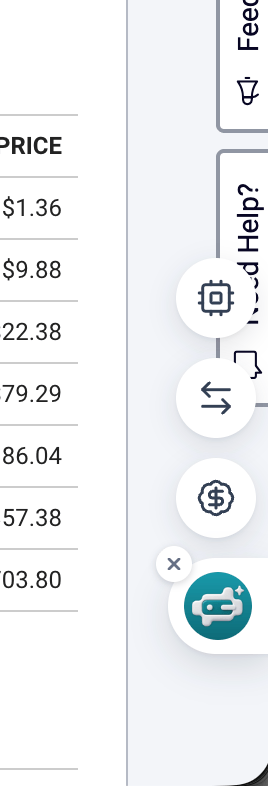 On some pages a compact **floating toolbar** appears at the edge of the window. Use it to open component details, alternatives, or price comparison without hunting for the main extension icon. Close it with **×** when you want a clear view of the distributor page.
## ECAD from the extension
From **CAD models** in the sidebar:
1. Download symbol, footprint, or 3D from the catalog when **CAD Models** has files for this MPN.
2. Or start **KiCad library generation** (Beta) and download when ready.
Import steps for your EDA tool: [EDA integration](/en-US/eda-integration).
## Open the full web app
Use links in the sidebar to open the **full PartGenie component page** or continue in Search when you need Projects, BOM, Design, or Knowledge.
## Supported sites
Today includes major distributors such as **DigiKey**, **Mouser**, and **LCSC**, plus additional manufacturer and distributor pages PartGenie recognizes. Coverage expands over time; if a page you rely on is missing, tell us at [support@partgenie.ai](mailto:support@partgenie.ai).
## Privacy and permissions
The extension needs access to supported product pages so it can read the MPN and page context required to identify the component. It does not replace your distributor login or place orders for you—**Purchase** links open the distributor’s own checkout flow.
## Troubleshooting
| Issue | Try |
| - | - |
| Sidebar empty or wrong part | Refresh the product page; confirm you are on the SKU detail URL, not search results |
| Sign-in loop | Allow third-party cookies for PartGenie or sign in at app.partgenie.ai first, then reload the page |
| Extension missing on a distributor | Site may not be supported yet—use [Search](/en-US/ai-search) with the MPN instead |
More account issues: [Account troubleshooting](/en-US/account-troubleshooting).
## Related
* [Integrations overview](/en-US/integrations)
* [EDA integration](/en-US/eda-integration)
* [Changelog — PartGenie for Chrome](/en-US/changelog)
This documentation is built and hosted on [Mintlify](https://mintlify.com), a developer documentation platform.
On some pages a compact **floating toolbar** appears at the edge of the window. Use it to open component details, alternatives, or price comparison without hunting for the main extension icon. Close it with **×** when you want a clear view of the distributor page.
## ECAD from the extension
From **CAD models** in the sidebar:
1. Download symbol, footprint, or 3D from the catalog when **CAD Models** has files for this MPN.
2. Or start **KiCad library generation** (Beta) and download when ready.
Import steps for your EDA tool: [EDA integration](/en-US/eda-integration).
## Open the full web app
Use links in the sidebar to open the **full PartGenie component page** or continue in Search when you need Projects, BOM, Design, or Knowledge.
## Supported sites
Today includes major distributors such as **DigiKey**, **Mouser**, and **LCSC**, plus additional manufacturer and distributor pages PartGenie recognizes. Coverage expands over time; if a page you rely on is missing, tell us at [support@partgenie.ai](mailto:support@partgenie.ai).
## Privacy and permissions
The extension needs access to supported product pages so it can read the MPN and page context required to identify the component. It does not replace your distributor login or place orders for you—**Purchase** links open the distributor’s own checkout flow.
## Troubleshooting
| Issue | Try |
| - | - |
| Sidebar empty or wrong part | Refresh the product page; confirm you are on the SKU detail URL, not search results |
| Sign-in loop | Allow third-party cookies for PartGenie or sign in at app.partgenie.ai first, then reload the page |
| Extension missing on a distributor | Site may not be supported yet—use [Search](/en-US/ai-search) with the MPN instead |
More account issues: [Account troubleshooting](/en-US/account-troubleshooting).
## Related
* [Integrations overview](/en-US/integrations)
* [EDA integration](/en-US/eda-integration)
* [Changelog — PartGenie for Chrome](/en-US/changelog)
This documentation is built and hosted on [Mintlify](https://mintlify.com), a developer documentation platform.